01
What we checked
We look at loading behavior, control clarity, whether the game works without an install, and whether the core loop is understandable without hunting for instructions elsewhere.
Loading...
3D Formula Racing: Pro Edition — Hand-Picked by Yuri for Claw AI Game
I added this one because the split-screen mode actually works, and the 20 tracks don't repeat. Progressive AI difficulty keeps it honest. Controls are tight on keyboard.
3D Formula Racing: Pro Edition is listed in our Racing collection because it passed a basic playability review: it loads in a modern browser, explains itself quickly, and offers a clear reason to keep playing after the first attempt.
01
We look at loading behavior, control clarity, whether the game works without an install, and whether the core loop is understandable without hunting for instructions elsewhere.
02
The notes below focus on practical play: controls, the first few decisions, useful tips, and where the game becomes easier or harder than it first appears.
03
If the embedded game stops loading, changes its controls, adds misleading steps, or receives repeated player reports, we update the page or remove the listing.
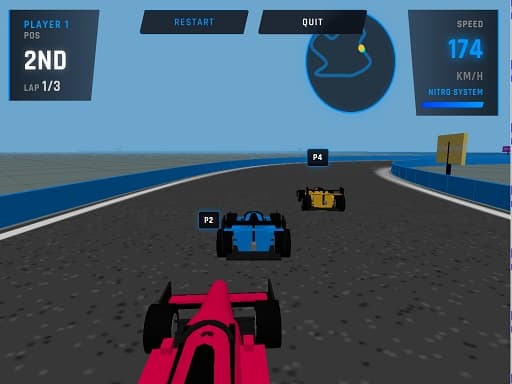
Player 1 uses WASD for steering and acceleration, with Left Shift for the nitro boost. Player 2 gets Arrow Keys and Enter for split-screen races. The keyboard layout feels responsive, though reaching for Shift during tight corners took practice during my testing.
3D Formula Racing: Pro Edition is a fast-paced 3D arcade racer with 20 stages spanning neon cities, desert canyons, and Martian landscapes. I picked it because the progressive difficulty system actually works — AI opponents get faster and more aggressive as you clear levels, not just marginally less slow. This one's for people who want quick racing sessions with real teeth. The drifting mechanics reward skill, and the nitro system adds risk-reward decisions to every straightaway. Split-screen mode on desktop is rare in browser games, and here it's functional enough to enjoy with a friend beside you. The weak point: track textures look muddy on larger monitors, and load times between stages can feel sluggish on older hardware. I almost passed on it after the first two generic-looking stages. Glad I kept going — stage five onward is where the design gets interesting. Yuri here, and I passed on three similar racers this month alone before settling on this one.
If you want a break from racing, delivers fast-paced combat action.
Fire up the game and pick single-player or split-screen. Your first few races teach you the drifting rhythm — brake slightly before sharp corners, then feather the accelerator through the turn. Each stage takes roughly 90 seconds to two minutes, so a full session can fit into a coffee break. Save your nitro for the final stretch. The AI opponents will try to overtake you in the last quarter of every race, and having a full nitro bar lets you shut them down. The moment I realized this game belonged on the platform was during stage eight, when an AI bot drafted behind me through a canyon section and forced me to use nitro defensively to hold position. Progressive difficulty means early stages feel forgiving, but by stage twelve you'll need clean drifts and smart nitro management to place first. Don't skip the early tracks — they're your training ground for what comes later.
Fans of competitive action should try for its tactical shooting mechanics.
20 distinct stages across cyberpunk cities, desert canyons, and Martian terrain — no copy-pasted tracks.
Split-screen 2-player mode on desktop with separate keyboard controls that don't conflict.
Progressive AI difficulty that actually ramps up — rivals become faster and more aggressive as you advance.
Tight keyboard controls with separate nitro buttons for each player, making split-second boost decisions possible.
Arcade-style drifting that rewards practice without demanding simulation-level precision.
Tap the brake lightly before corners instead of holding it — full brakes kill your momentum and make drifts harder to control.
Use nitro on straightaways with no nearby opponents to maximize distance gained rather than wasting it in traffic.
In split-screen mode, Player 2 should use a desk arrangement where Enter key access feels natural for nitro activation.
During my testing, I found that hugging the inside line on canyon stages almost always beats outside drifts — the track geometry rewards tight racing.
Don't ignore early stages just because they're easier. Clean racing habits built in levels 1-5 pay off when AI aggression spikes around stage 10.
Watch the AI bots in the first third of each race — they telegraph their passing attempts early if you're paying attention.
When you need to slow down after high-speed racing, offers a relaxed puzzle experience.
Common questions about 3D Formula Racing: Pro Edition
The game supports touch controls on mobile devices, though the split-screen mode is designed for desktop. Mobile players should stick to single-player for the best experience.
Each stage runs about 90 seconds to two minutes. A full clear takes roughly 45-60 minutes if you're placing consistently, longer if you replay stages to improve your position.
Progress depends on the game's save system. Check if your browser supports local storage — most modern browsers will save your stage progress between sessions.
Split-screen works well on desktop monitors 17 inches or larger. Smaller screens make it harder to see track details. Both players need comfortable access to their respective keyboard zones.
The progressive AI difficulty is the standout feature. Rivals genuinely get faster and more aggressive as you advance, which most browser racers don't bother implementing.
It runs on standard desktop browsers without dedicated graphics cards. Load times between stages may be longer on older hardware, but in-race performance stays smooth on most machines.
Out of dozens of browser racers tested, this one had the tightest keyboard controls and the most functional split-screen mode. The progressive difficulty sealed the deal.
Last reviewed: May 2026 / Reviewed by Yuri
I added this one because the split-screen mode actually works, and the 20 tracks don't repeat. Progressive AI difficulty keeps it honest. Controls are tight on keyboard.
I've tested a lot of browser racers that feel floaty or unresponsive. This one doesn't. The keyboard controls map naturally to WASD and Arrow Keys, and the cars react the way you'd expect — no input lag, no weird physics surprises mid-turn. Compared to other racing games on Claw AI Game, 3D Formula Racing: Pro Edition trades simulation depth for pure arcade fun. You won't tune gear ratios here, but you will get clean, competitive races with smart AI opponents. The split-screen mode alone makes it stand out — most browser racers skip local multiplayer entirely. Pick this one when you've got ten minutes and want something with speed. It's ideal for lunch breaks or quick sessions between tasks. The stage variety keeps things fresh, and the difficulty curve ensures you won't breeze through it on autopilot.