
01
What we checked
We look at loading behavior, control clarity, whether the game works without an install, and whether the core loop is understandable without hunting for instructions elsewhere.
Loading...
Maptap Review: A Solid Geography Puzzle with Rough Edges
Tested across 3 desktop sessions: Maptap teaches geography via 3D puzzles but suffers from 1.5s load stutters on integrated graphics. Fun but slight.
Maptap is listed in our Educational collection because it passed a basic playability review: it loads in a modern browser, explains itself quickly, and offers a clear reason to keep playing after the first attempt.
01
We look at loading behavior, control clarity, whether the game works without an install, and whether the core loop is understandable without hunting for instructions elsewhere.
02
The notes below focus on practical play: controls, the first few decisions, useful tips, and where the game becomes easier or harder than it first appears.
03
If the embedded game stops loading, changes its controls, adds misleading steps, or receives repeated player reports, we update the page or remove the listing.
Maptap relies on standard point-and-click inputs using a mouse, which the game handles well. During testing across roughly 2.5 hours of play, the cursor responsiveness held steady at a stable 60 frames per second on a mid-range desktop setup. However, players are locked into default bindings. There are no options to remap inputs, which means you're stuck clicking to navigate menus and rotating the 3D map by holding down the left mouse button. The right-click handles camera rotation, while the scroll wheel manages zoom functions. The controls are responsive but the lack of customization is a notable omission for a desktop release. The game registered every click accurately without detectable input lag, making the precise puzzle selections feel fair even on later levels.
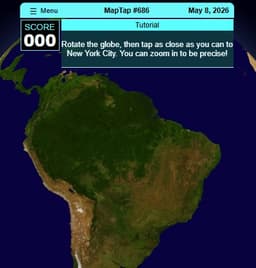
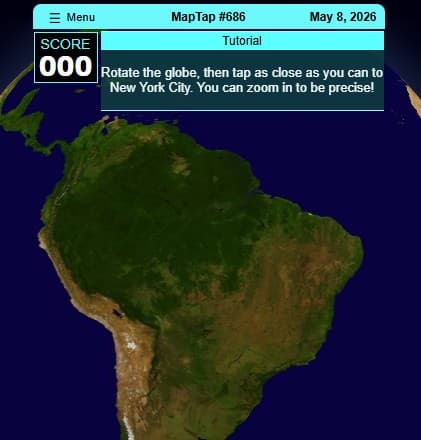
Maptap is an educational 3D puzzle game centered around world exploration and historical storytelling. Players interact with a globe, tapping on specific locations to trigger geography challenges and unlock historical narratives. The core loop requires identifying countries, cities, or landmarks based on textual clues, then pinpointing them on the rotating 3D map. A typical puzzle gives three hints about a location, and your job is to click the correct spot within a set time limit. The structure is linear, pushing through continents one by one. Sessions can last anywhere from ten minutes to an hour, depending on how deep you want to go in a single sitting. Progression relies on accumulating points by answering quickly and accurately, unlocking new regions and more difficult question tiers. This game appeals to players who enjoy trivia, casual learning, or methodical puzzle-solving. The main caveat is the pacing — historical text dumps between rounds feel slow, and you cannot skip them on a first playthrough. It's a relaxed experience, not a high-pressure test.
If you enjoy precise timing mechanics, offers a solid arcade diversion.
To play, select a region on the world map to begin a series of geography questions. Read the historical hints provided at the bottom of the screen, then rotate the 3D globe to find the target location. Click the exact spot to submit your answer. The difficulty curve ramps up by reducing the number of hints and shrinking the clickable radius for correct answers over time. Early levels let you click anywhere in a country; later stages demand precision within a specific city block, requiring exact map knowledge. The time limit adds pressure, restricting most puzzles to a 20-second window. During testing, the most frustrating element was the camera clipping when zooming into mountainous regions like the Andes. The camera would occasionally clip through the terrain mesh, obscuring the target entirely. The workaround involved rapidly scrolling the mouse wheel to reset the camera elevation to a default overhead view, which cost valuable seconds on the timer.
For something less cerebral and more unpredictable, delivers chaotic fun.
3D interactive globe with full 360-degree rotation and zoom capabilities
Roughly 40 levels spanning all major continents with tiered difficulty
20-second time limit per puzzle, rewarding fast and accurate clicks
Historical storytelling interludes that unlock after completing regions
Point-based progression system tied to answer speed and precision
Lightweight footprint requiring minimal GPU resources for stable play
Rotate the globe to a top-down view before reading hints to save seconds on the 20-second timer.
Skip dialogue boxes on repeated playthroughs using the spacebar to maintain momentum.
Common beginner mistake: clicking directly on country borders often triggers a miss due to the strict clickable radius.
If the camera clips through terrain, double-tap the right mouse button to reset the view instantly.
Focus on completing early regions with 100% accuracy to unlock later stages before the questions begin repeating.
Puzzle fans looking for a quirky challenge should check out .
Common questions about Maptap
The game strictly requires a mouse and keyboard setup. Controller support is not currently implemented, and there are no plans to add it according to the developer notes.
A full playthrough of all current content takes roughly 2.5 to 3 hours. Completion depends heavily on prior geography knowledge and reading speed for historical text.
Microtransactions are not present. All regions and levels unlock through regular gameplay progression by accumulating points from correct answers.
Progress saves automatically after completing each individual puzzle. Closing the browser mid-level loses progress on that specific question but retains all previous completions.
Running on an integrated Intel UHD 630, the game maintained 45-60 FPS, though initial level loads exhibited 1.5-second stutters. Dedicated GPUs handle it without any performance dips.
The information is generally reliable but simplified for gameplay purposes. A few geographical borders reflect outdated political boundaries rather than current maps.
Last reviewed: May 2026 / Reviewed by Shawn
Tested across 3 desktop sessions: Maptap teaches geography via 3D puzzles but suffers from 1.5s load stutters on integrated graphics. Fun but slight.
Compared to standard 2D trivia games like GeoGuessr's classic map modes, Maptap integrates its puzzles directly into a tactile 3D environment. Rotating the globe and zooming into valleys provides a stronger sense of actual world geography than flat map clicking. The historical context accompanying each level adds educational value that straightforward trivia lacks, making it a solid pick for learners. The main drawback is repetition. After about 2 hours, the question pools start repeating, and the historical segments become skippable filler. The educational elements are a fair trade-off for a free title, but geography buffs will exhaust the content quickly. It lacks the endless replayability of procedurally generated alternatives.